
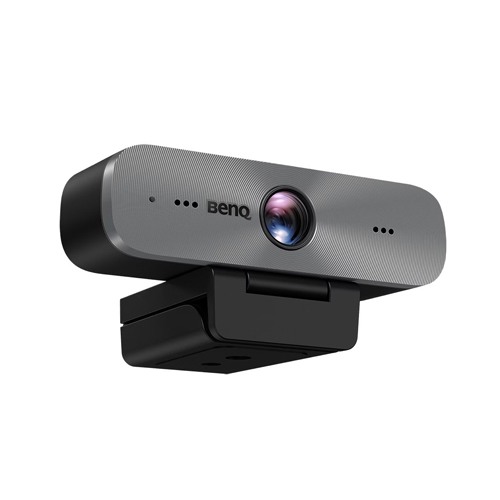
Benq DVY31 Zoom Certified Full HD Business Webcam




-20 %


Benq DVY31 Zoom Certified Full HD Business Webcam
Special Price:
11,600৳
Regular Price:
14,500৳
- Stock: In Stock
- Brand: BenQ
- Model: DVY31
Chat Through
Contact for Bulk Quantity: 01771833944
অর্ডার করার পূর্বে কাস্টমার কেয়ার থেকে পন্যের স্টক ও ডেলিভারি সম্পর্কে জেনে নেয়ার অনুরোধ করা যাচ্ছে। প্রযুক্তি পণ্যের মূল্য অস্থিতিশীল হওয়ায় কারণে যেকোন মুহূর্তে যেকোন প্রযুক্তি পণ্যের মূল্য পরিবর্তন হতে পারে।
Quick Compare
| Product Details | ||||
| Product | Benq DVY31 Zoom Certified Full HD Business Webcam | Logitech C920 HD PRO Webcam | Logitech BRIO 500 FHD Graphite Webcam #960-001423 | Logitech C922 Pro Full HD Webcam |
| Image |  |
 |
 |
 |
| Price | |
|
|
|
| Model | DVY31 | Model | BRIO 500 | Model |
| Brand | BenQ | Logitech | Logitech | Logitech |
| Availability | In Stock | In Stock | In Stock | Discontinued |
| Rating | Based on 0 reviews. |
Based on 0 reviews. |
Based on 0 reviews. |
Based on 0 reviews. |
| Summary | Benq DVY31 Zoom Certified Full HD Business WebcamBenQ DVY31 Zoom Certified Full HD Business Webcam is a premium solution designed to deliver crystal-clear video and audio performance for professional meetings, webinars, and online collaborations. With its 1080p Full HD resolution (1920 × 1080), this webcam ensures sharp and detailed visuals, making every video call look professional and engaging. Its 92° wide-angle lens combined with a 90° field of view (FOV) allows it to capture more participants or a larger workspace without distortion, making it ideal for both personal and group conferencing. One of the standout features of the DVY31 is its Zoom Certification, ensuring optimal performance and compatibility with Zoom’s platform for seamless virtual communication. The dual omnidirectional microphones are equipped with advanced noise reduction technology, ensuring your voice is captured clearly while minimizing background disturbances. Whether you are in a quiet office or a busy work environment, your audio remains professional and distraction-free. The webcam features low distortion and enhanced color performance, providing natural and true-to-life images. Its automatic light adjustment ensures you look your best even in varying lighting conditions, such as dim rooms or bright backgrounds. With auto-focus capabilities, the DVY31 keeps you sharp and clear at all times without the need for manual adjustments. Connectivity is hassle-free thanks to its USB 2.0 plug-and-play design, eliminating the need for additional drivers or software. The webcam is compatible with both Windows and macOS, making it a versatile choice for a wide range of users.Finished in sleek black, the BenQ DVY31 combines style with performance, making it a perfect fit for modern workspaces. Whether you are attending virtual meetings, conducting training sessions, or collaborating remotely, this webcam delivers reliable, high-quality performance to keep you connected and looking professional.Features1080p Full HD resolution (1920 × 1080) for sharp, clear visuals92° wide-angle lens with 90° field of view for group or solo callsZoom Certified for seamless integration with Zoom meetingsDual omnidirectional microphones with advanced noise reductionLow distortion and enhanced color performance for natural image qualityAutomatic light adjustment for optimal visibility in any lightingAuto-focus to keep subjects clear and sharp at all timesUSB 2.0 plug-and-play connectivity, no extra software requiredCompatible with Windows and macOS for flexible useSleek black design to match professional work setups.. | Logitech C920 HD PRO Webcam It provides users with Full HD 1080p video calling and recording. There are 2 built-in microphones for natural stereo audio and automatic noise reduction. 2 built-in microphones that provide natural stereo audio and automatic noise reduction. It is compatible with most social networking programs such as Skype, Windows Live Messenger and Google Voice. Logitech Vid HD software provides fast, free and easy video calling. The full HD 5 element glass lens and premium autofocus captures clear, precise images. Automatic light correction records and corrects in low light settings. .. | Logitech BRIO 500 FHD Graphite Webcam #960-001423Logitech BRIO 500 FHD Graphite Webcam ensures that you always look and sound natural in meetings so you can connect more genuinely with others. BRIO 500 show up to every video call feeling confident, engaged, and authentic.PUT YOUR BEST SELF FORWARDFeel confident in every hybrid meeting with a webcam that brings personality and ease to your office setup. Auto light correction and noise-reducing mics ensure you look and sound clear and natural in every meeting you join.BE FULLY PRESENTJoin any business meeting feeling confident, engaged, and authentic with a webcam that lets you be your best self.LIFT YOUR VOICEBe sure your colleagues hear what you have to say, even when you’re without your headset or earbuds. Noise-reducing mics filter out background sound and enhance your voice so you're heard clearly and not the noise around you.INSTANT PRIVACYRotate the integrated privacy shutter to completely block the camera when you don’t wish to be seen. Designed to protect your privacy. Engineered for easy operation... | Logitech C922 Pro Full HD Webcam DESIGNED FOR SERIOUS STREAMERS Logitech C922 Pro Connect with superior clarity every time you go live on channels like Twitch and YouTube. Stream anything you want in your choice of Full 1080p at 30fps or hyperfast HD 720p at 60fps. Broadcast masterfully with reliable no-drop audio, autofocus, and a 78° diagonal field of view. Includes free 3-month premium XSplit license. C922 streaming webcam FULL HIGH-DEF 1080P STREAMING Stream and record vibrant, true-to-life video. Logitech C922 Profeatures a glass lens with autofocus and a 78° diagonal field of view. Full HD streaming captures all the details, bright, natural colors, and fluid video at 1080p/30fps—and in HD at 720p/60fps. Use Capture to zoom, pan, and edit. Full High-def streaming Hyperfast frame rate streaming webcam HYPERFAST FRAME RATE Serious streamers need the hyperfast frame rate of 60 fps at 720p for particularly smooth video, and that’s just what the C922 delivers. You'll be live broadcasting with no lag or distortion. Auto light correction AUTO LIGHT CORRECTION HD autofocus and light correction work to fine-tune lighting conditions, producing razor-sharp, high-def video in any lighting, so you always look great in your stream. DUAL-MIC STEREO SOUND Fitted with two Omni-directional microphones, the C922 Pro Webcam captures more realistic sound from multiple angles—so your voice comes through sounding natural and clear in your stream. Download LGS or Logitech G HUB Now Duel Mic Stereo sound C920 Pro HD Webcam product image 3-MONTH XSPLIT PREMIUM LICENSE The all-in-one live streaming solution includes a complete set of features for XSplit Broadcaster and XSplit Gamecaster, giving you everything you need to stream like a pro. 3-month voucher included. ALL-IN-ONE CONTENT CREATION WITH CAPTURE Easily create, record, and customize settings with our Capture app. A suite of features lets you fully edit and customize your stream, so you can add transitions and text overlays, customize webcam settings, and more... |
Recently Viewed

Most Viewed


Same category


Same Brand