
Epson EcoTank L3150 Wi-Fi Multifunction InkTank Printer
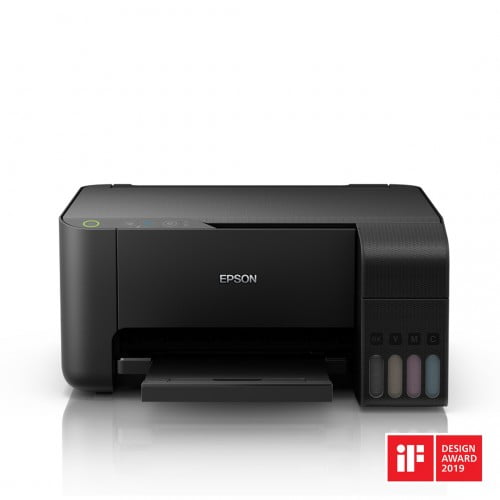
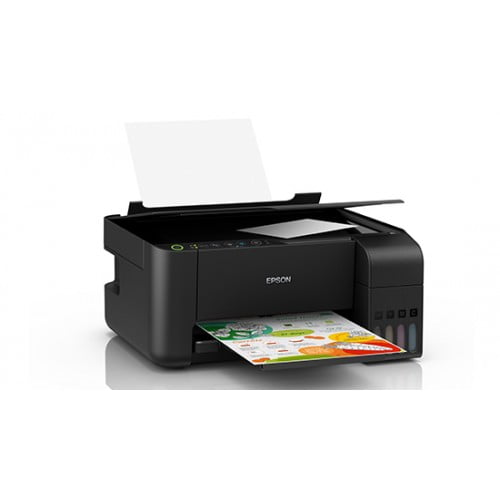


Epson EcoTank L3150 Wi-Fi Multifunction InkTank Printer
TBA
- Stock: Out Of Stock
- Brand: Epson
- Model: OPEP01UL
- SKU: OPEP01UL
Chat Through
Contact for Bulk Quantity: 01771833944
অর্ডার করার পূর্বে কাস্টমার কেয়ার থেকে পন্যের স্টক ও ডেলিভারি সম্পর্কে জেনে নেয়ার অনুরোধ করা যাচ্ছে। প্রযুক্তি পণ্যের মূল্য অস্থিতিশীল হওয়ায় কারণে যেকোন মুহূর্তে যেকোন প্রযুক্তি পণ্যের মূল্য পরিবর্তন হতে পারে।
Quick Compare
| Product Details | ||||
| Product | Epson EcoTank L3150 Wi-Fi Multifunction InkTank Printer | HP Laserjet MFP 1188a Multifunction Mono Laser Printer | Epson EcoTank L3310 Multifunction InkTank Printer | Epson M100 Ink Tank Printer |
| Image |  |
 |
 |
 |
| Price | 19,000৳ | |
|
|
| Model | OPEP01UL | Laserjet MFP 1188a | L3310 | Model |
| Brand | Epson | HP | Epson | Epson |
| Availability | Out Of Stock | In Stock | In Stock | In Stock |
| Rating | Based on 0 reviews. |
Based on 0 reviews. |
Based on 0 reviews. |
Based on 0 reviews. |
| Summary | Epson EcoTank L3150 Wi-Fi Multifunction InkTank Printer Epson EcoTank L3150 Wi-Fi Multifunction InkTank Printer built to bring down costs, and bring up productivity. The integrated ink tank enables spill-free, error-free refilling with individual bottles that have designated nozzles. Other features include borderless 4R printing and an ultra-high yield of 7,500 coloured and 4,500 black-and-white pages. The EcoTank L3150 also delivers the convenience of wireless connectivity, allowing direct printing from smart devices. It has Special Feature of Cost per print- 7 paise (Black) and 18 paise (Colour).Compact integrated tank design.High yield ink bottles.Spill-free, error-free refilling. Wi-Fi, Wi-Fi Direct. Epson Connect (Epson iPrint, Epson Email Print and Remote Print Driver). Borderless printing up to 4R... | HP Laserjet MFP 1188a Laser PrinterThe HP Laserjet MFP 1188a Multifunction Mono Laser Printer is designed to meet printing, scanning, and copying needs with ease. Built with HP’s trusted laser technology, this model focuses on productivity, durability, and cost-effective performance. Whether you are managing documents at home, running a small business, or working in a corporate setup, this printer delivers consistent results without unnecessary complexity.Key Features and Functions of the PrinterThe HP Laserjet MFP 1188a Laser Printer is a multifunction device that combines printing, scanning, and copying into a single compact unit. This all-in-one functionality helps save space while increasing efficiency. It supports monochrome laser printing, which is ideal for text-heavy documents such as invoices, reports, and assignments. The printer is known for fast output, clear text quality, and dependable operation, making it suitable for users who value speed and accuracy over color printing.Print Speed and Performance EfficiencyPerformance is one of the strongest aspects of this printer. It offers a competitive print speed that helps users complete tasks quickly, even during high-volume workloads. The fast warm-up time ensures minimal waiting, while consistent output quality keeps documents looking professional. The HP Laserjet MFP 1188a Laser Printer is optimized for daily use, allowing users to handle bulk printing jobs without frequent interruptions or performance drops.Print Quality and Resolution ExplainedWhen it comes to print quality, this printer excels in producing sharp text and clean lines. The laser printing technology ensures precise character definition, making it ideal for official documents and business correspondence. Even small fonts remain readable, and graphics appear clean without smudging. This level of output quality is particularly beneficial for offices that require professional-looking paperwork on a daily basis.Design, Build Quality, and Space SavingThe printer features a compact and practical design that fits easily into small office spaces or home workstations. Its sturdy build reflects HP’s commitment to long-lasting hardware. The control panel is user-friendly, allowing even first-time users to operate the machine with confidence. Despite its multifunction capabilities, the device does not feel bulky, making it an excellent for environments where desk space is limited... | Epson EcoTank L3310 Multifunction InkTank Printer The Epson EcoTank L3310 is a compact A4 multifunction ink tank printer that prints, scans and copies from one small unit. Instead of cartridges it uses refillable ink tanks filled from Epson 003 bottles, so a home or small office can keep printing for a long time before buying ink again. It connects to a desktop or laptop computer through a simple USB cable, so setup is quick and printing stays stable and reliable for everyday work. Inside, Epson uses its Heat-Free piezoelectric printhead. Because the ink is pushed out by pressure rather than by heating, the printer runs at about 12 W while operating, which suits homes and offices where power use matters. The maximum print resolution is 5760 x 1440 dpi with a smallest droplet of 3 pl, so text stays sharp and photos look clean on glossy paper. The L3310 is a good fit for students printing assignments, families printing photos and forms, and small shops handling invoices, letters and scanned documents. Its flatbed scanner offers 600 x 1200 dpi optical resolution, and standalone copying works without a computer. The user-replaceable maintenance box also means routine care can be done at home without sending the printer away for service. Refillable Tanks With High Page Yields One black 003 bottle is rated for up to 4,700 pages, and a set of cyan, magenta and yellow bottles is rated for about 7,500 pages composite yield. Filling the tanks from bottles is simple, and the ink level is easy to check at a glance, so you know when a refill is coming. Print Speed for Daily Documents Under the ISO 24734 standard, the L3310 prints up to 11 images per minute in black and 6 in colour. In draft mode it reaches up to 33 pages per minute in black and 15 in colour. The first black page comes out in about 10 seconds, which helps when you need a single form or receipt quickly. Simple USB Connection for Everyday UseThe L3310 connects to your computer with a USB cable, a setup that suits home desks and small offices where one PC handles most of the printing. Once the driver is installed, printing, scanning and copying jobs can be started straight from your computer, and the printer is ready to work whenever you need it.Flatbed Scanning and Standalone Copying The colour CIS flatbed scanner covers an area of 216 x 297 mm, enough for A4 pages, certificates and ID documents. Copying can be done straight from the printer with up to 20 copies in one run, so photocopying a national ID card or a page from a book takes only a moment. Borderless Photos and Flexible Paper Handling The rear tray holds up to 100 sheets of plain paper or 20 sheets of premium glossy photo paper. It supports A4, A5, A6, B5, Letter, Legal and envelopes, and it can print borderless photos up to 4R, making it handy for family pictures and small posters. Why Buy the EcoTank L3310 from Ultra Technology Ultra Technology supplies the genuine Epson EcoTank L3310 with warranty support and guidance on setup, ink refilling. Our team can help you pick the right ink and paper for your work. Explore more Epson printers and our full printer collection. Frequently Asked Questions Q: How does the Epson L3310 connect to a computer?A: It connects through a USB cable. Q: Which ink does the L3310 use?A: It uses Epson 003 ink bottles in black, cyan, magenta and yellow. Q: Does it print on both sides automatically?A: No. Automatic 2-sided printing is not supported, but you can turn the paper over by hand. Q: Can it copy without a computer?A: Yes. Standalone copying works directly from the printer, up to 20 copies at a time... | Epson M100 Ink Tank Printer Epson M-100, Printer Type - Ink Tank Printer, Speed PPM (Black) - 34 PPM Black, Print Resolution (Pixel) - 1440 x 720 dpi, Paper - A4, A5, A6, B5, Letter, Legal, Envelopes, Max. Paper Size- 8.5 x 44", Interface - Hi-Speed USB 2.0, 100BASE-TX / 10BASE-T, OS Compatibility - Windows XP/XP Professional x64 Edition/Vista/7/8 Mac OS X 10.5.8 or later, Weight (Kg) - 3.4 Kg.. |
Recently Viewed


-80x80.jpg "Deepcool AK620 G2 DIGITAL NYX Top Cover CPU Cooler")
Most Viewed


Same category


Same Brand

