
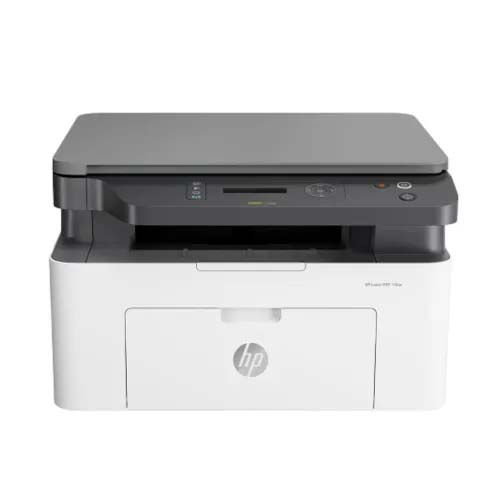
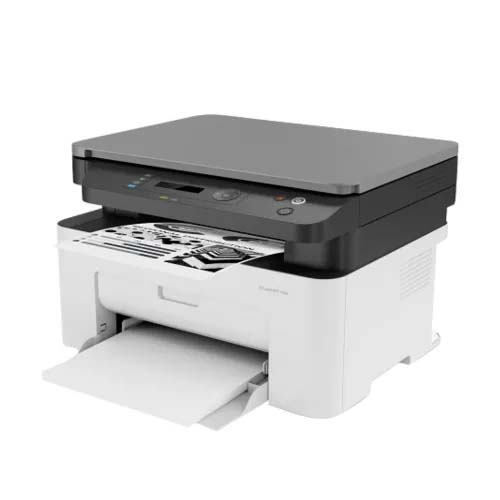
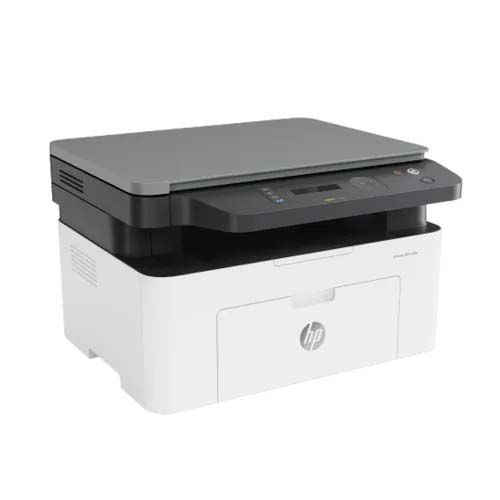
HP Laser MFP 136a Multifunction Laser Printer
-5 %


HP Laser MFP 136a Multifunction Laser Printer
Special Price:
20,000৳
Regular Price:
21,000৳
- Stock: In Stock
- Brand: HP
- Model: MFP 136a
Chat Through
Contact for Bulk Quantity: 01771833944
অর্ডার করার পূর্বে কাস্টমার কেয়ার থেকে পন্যের স্টক ও ডেলিভারি সম্পর্কে জেনে নেয়ার অনুরোধ করা যাচ্ছে। প্রযুক্তি পণ্যের মূল্য অস্থিতিশীল হওয়ায় কারণে যেকোন মুহূর্তে যেকোন প্রযুক্তি পণ্যের মূল্য পরিবর্তন হতে পারে।
Quick Compare
| Product Details | ||||
| Product | HP Laser MFP 136a Multifunction Laser Printer | HP OfficeJet Pro 8210 Printer | Pantum M6700DW Mono Laser Multifunction Printer | Epson L3110 All-in-One Ink Tank Printer |
| Image |  |
 |
 |
 |
| Price | |
|
|
|
| Model | MFP 136a | OfficeJet Pro 8210 | M6700DW | Model |
| Brand | HP | HP | Pantum | Epson |
| Availability | In Stock | In Stock | In Stock | Out Of Stock |
| Rating | Based on 0 reviews. |
Based on 1 reviews. |
Based on 0 reviews. |
Based on 0 reviews. |
| Summary | HP Laser MFP 136a Multifunction Laser Printer for Fast, Reliable & Efficient Office Printing HP Laser MFP 136a Multifunction Laser Printer is a compact all-in-one printing solution designed for home users, students, freelancers, and small businesses that need dependable monochrome printing without sacrificing quality. Combining printing, scanning, and copying into one space-saving device, this multifunction laser printer helps you complete everyday tasks quickly while reducing workspace clutter. Its sleek design easily fits on a desk while delivering professional-quality documents whenever you need them. Built with HP's trusted laser printing technology, the HP Laser MFP 136a produces sharp black text and clean graphics that are ideal for business reports, invoices, study materials, contracts, and official documents. The printer offers consistent performance even during frequent daily use, making it a reliable choice for users who value productivity and efficiency. Simple USB connectivity ensures a quick installation process, allowing you to start printing with minimal setup. The intuitive control panel makes operating the printer easy for both beginners and experienced users. Whether you need to scan important paperwork, make quick copies of documents, or print multiple pages for work or school, this multifunction printer streamlines every task into a single device. Energy-efficient operation and HP's durable engineering help reduce maintenance while keeping printing costs manageable over time. The printer is compatible with a wide range of Windows operating systems, making it suitable for various office and home environments. If you're looking for a dependable monochrome laser printer that combines quality, efficiency, and convenience, the HP Laser MFP 136a Multifunction Laser Printer offers an excellent balance of performance and affordability. Its all-in-one functionality helps save both time and office space while delivering the professional results users expect from HP. Key Features of HP Laser MFP 136a Multifunction Laser Printer That Improve Everyday Productivity Print, Scan & Copy in One DeviceEliminates the need for multiple machines, helping you save valuable desk space while handling everyday office tasks from a single device. Sharp Monochrome Laser PrintingProduces crisp text and professional-looking documents, making reports, invoices, assignments, and business paperwork more presentable. Fast Printing PerformanceReduces waiting time during busy work hours, allowing you to complete large document batches more efficiently. Compact Space-Saving DesignFits comfortably into small offices, study rooms, or home workstations without occupying unnecessary space. Easy USB ConnectivityQuick installation lets users start printing almost immediately without complicated network configurations. User-Friendly Control PanelSimple controls make printing, copying, and scanning straightforward, even for first-time users. High-Quality Document ScanningDigitize contracts, certificates, receipts, and important paperwork for convenient storage and sharing. Reliable HP PerformanceBuilt with HP's trusted engineering to deliver consistent printing quality and dependable long-term operation. Efficient Copy FunctionCreate quick copies of business documents, forms, or study materials without needing a separate copier. Low Maintenance OperationDesigned for dependable daily use with minimal upkeep, helping reduce interruptions and improve productivity. Real Buyer Reviews and Ratings for HP Laser MFP 136a Multifunction Laser Printer Customers consistently appreciate the HP Laser MFP 136a Multifunction Laser Printer for its reliable performance, excellent print quality, and compact footprint. Many home office users mention that the printer produces crisp text and handles daily printing tasks smoothly without frequent issues. Students value its fast printing speed for assignments, while small business owners praise the convenience of having printing, scanning, and copying in one machine. Buyers also highlight the easy installation process and simple controls that make operation hassle-free. Overall, the printer receives positive feedback for offering dependable HP quality, efficient document handling, and excellent value for users looking for an affordable monochrome multifunction laser printer. Choose the Right Laser Printer Category for Long-Term Printing Efficiency If you're planning to upgrade your workspace, explore our complete Laser Printer collection to compare different HP printing solutions for home, office, educational, and business use. Whether you need a compact multifunction printer, a high-volume office printer, or an affordable monochrome printing solution, our Laser Printer category offers models that suit every requirement and budget. Browse the latest HP printers today and find the ideal printing solution that delivers reliable performance, professional document quality, and excellent long-term value for your everyday workflow. Frequently Asked Questions Q1. Does the HP Laser MFP 136a support printing, scanning, and copying?Yes, it is a multifunction printer that can print, scan, and copy documents. Q2. Is the HP Laser MFP 136a suitable for home and small office use?Yes, its compact design and reliable performance make it ideal for both environments. Q3. What type of documents does this printer produce best?It delivers sharp monochrome text and professional-quality business documents... | HP OfficeJet Pro 8210 PrinterHP OfficeJet Pro 8210 Printer is Control costs and printing practices, with affordable color and comprehensive fleet-wide management. Print professional-quality color and get seamless print management features. Boost efficiencies with a variety of mobile printing choices. Ideal for small workgroups that need affordable, professional-quality color with outstanding fleet management capabilities and mobile printing choices. This HP OfficeJet Pro 8210 Printer is intended to work only with cartridges that have a new or reused HP chip, and it uses dynamic security measures to block cartridges using a non-HP chip. Periodic firmware updates will maintain the effectiveness of these measures and block cartridges that previously worked. A reused HP chip enables the use of reused, remanufactured, and refilled cartridges.Never run out and save up to 50% with Instant InkWhen ink levels are low, a new cartridge is automatically dispatched at no extra cost. Enjoy total flexibility, because you can change or cancel your plan anytime. Save up to 50% on ink and never run out.[6] Print color or black-and-white for the same low price. Professional-quality prints for up to 50% less per page. Save even more with HP Instant Ink. Print up to 3x as many pages with optional Original HP high-yield ink cartridgesEverything you need to finish jobs fastSpeed through print jobs, using fast two-sided printing.[8]Easily print Microsoft Word and PowerPoint files, plus Adobe PDF files, directly from your USB drive. Stay productive with a 2.0-inch (5.08 cm) display with a keypad that’s intuitive and easy to use. Support your high-volume office with a device designed to print 30,000 pages per month for up to five users.Superior fleet control, seamless managementGet increased printing options with HP PCL 6, HP PCL 5c, HP PS, and scalable TrueType fonts. Easily take command of your printing environment from one central location, with HP Web Jetadmin. Make it easy for all to print with one common driver. Employ policy-based, fleet-wide protection features, using optional HP Jet Advantage Security Manager... | Pantum M6700DW Mono Laser Multifunction PrinterThe Pantum M6700DW is a multifunction mono laser printer that offers printing, copying, and scanning capabilities. It is designed to be a reliable and cost-effective printing solution for small businesses and home offices. With a compact size and sleek black finish, it can fit easily on a desk or shelf.The printer is equipped with a powerful 600MHz processor and 256MB of memory, allowing it to print up to 22 pages per minute in A4 size and 23 pages per minute in letter size. It can print at a resolution of 1200 x 1200 dpi, producing sharp and clear text and graphics. The first print out time is less than 7.8 seconds, which means you can quickly get your documents printed.The Pantum M6700NW also features manual duplex printing, which allows you to save paper and reduce costs. With the copy function, you can produce up to 22 copies per minute in A4 size and 23 copies per minute in letter size. The maximum copy resolution is 1200 x 1200 dpi, which ensures that the copies are clear and easy to read. The printer can zoom in and out from 25% to 400%, giving you the flexibility to adjust the size of your documents.The flatbed scanner can scan at a resolution of 1200 x 1200 dpi, producing high-quality scans of your documents and images. The scanner is capable of scanning up to 216 x 297mm on the flatbed and 216 x 356mm on the automatic document feeder (ADF), making it ideal for scanning a variety of documents. The printer has a maximum input capacity of 150 pages and an output capacity of 100 pages.Connectivity options for the Pantum M6700DW include LAN, Wi-Fi, and USB. The LAN connection is 10/100 Base-TX, while the Wi-Fi is IEEE 802.11b/g/n. The printer also has a high-speed USB 2.0 port for connecting to your computer. The printer is compatible with various paper sizes and types, including plain, thick, transparency, cardstock, label, envelope, and thin paper.Overall, the Pantum M6700DW is an excellent choice for small businesses and home offices that require a reliable and cost-effective printing solution. With its fast print speed, high-quality printing, and versatile features, it can help you increase productivity and save money on printing costs.FeaturesMultifunctional: This printer can print, scan, and copy all from one device, making it a versatile addition to any home or office.Fast print speeds: With a print speed of up to 22 pages per minute for A4 size and 23 pages per minute for letter size, the Pantum M6500NW is a fast and efficient printer.High resolution: The printer has a print resolution of 1200 × 1200 dpi, ensuring high-quality and sharp prints.Automatic Document Feeder (ADF): The Pantum M6500NW features an ADF, allowing you to scan or copy multiple pages without having to manually load each page.Wi-Fi connectivity: The printer supports Wi-Fi connectivity, which means you can print from anywhere in the room without having to physically connect the printer to your device.Multiple paper handling: This printer can handle a variety of paper sizes and types, including A4, A5, envelopes, labels, cardstock, and more.Energy efficient: The Pantum M6500NW is an energy-efficient printer, consuming only 3A of power, and is Energy Star certified.Easy toner replacement: The Pantum M6500NW uses a refillable toner cartridge that can print up to 1600 pages, making it an economical and easy-to-maintain printer.User-friendly design: With its intuitive control panel and easy-to-use features, the Pantum M6500NW is designed for ease of use and convenience.Compact size: The printer's dimensions of 417x305x301mm make it a compact and space-saving option for any home or office... | Epson L3110 All-in-One Ink Tank Printer Epson EcoTank L3110 All-in-One Ink Tank Printer built to bring down costs, and bring up productivity. The integrated ink tank enables spill-free, error-free refilling with individual bottles that have designated nozzles. Other features include border less 4R printing and an ultra-high yield of 7,500 colored and 4,500 black-and-white pages. This printer has compact integrated tank design, high yield ink bottles, Spill-free, error-free refilling and border less printing up to 4R.The L3110 prints at a high printing resolution of 5760 dpi, which delivering exceptionally high quality prints for all your needs. You will appreciate the fast print speeds of up to 10ipm for black and 5.0ipm for colour. In addition, the L3110 is capable of printing border less photos up to 4R. In this L3110 printer the printing Technology On-demand inkjet, Nozzle Configuration: 180 x 1 nozzles Black, 59 x 1 nozzles per color (Cyan, Magenta, Yellow), Print Direction: Bi-directional printing, Minimum Ink Droplet Volume: 3 pl, Printer Language: ESC / P-R, Maximum Copies.OS Compatibility is windows 7, 8, 8.1, 10, Vista, XP, Server 2003, 2008, 2012, 2016, Mac OS X 10.6.8 or later. The Copy speed is 7.0ipm (B), 1.7ipm (C).Paper Type are plain paper, Premium Glossy Photo Paper, Envelope, Postcard... |
Recently Viewed

Most Viewed


Same category


Same Brand
